The AWK Playbook: Turning Millions of Log Lines into Answers

Guys, let's be honest, the first time most of us open a server's log
file, it's a mess. Thousands, sometimes millions, of lines staring
back at us, and somewhere in there is the one clue we actually need.
Scrolling through that by eye is not a real strategy. It's slow,
it's painful, and you will miss something. Of
course in Linux we can use head, tail,
grep, etc, but can we filter data by content the way we
actually need?
This is exactly the gap AWK fills. It takes those raw, ugly log lines and turns them into something you can actually work with, pulling out specific fields, applying conditions, counting things up, and spitting out a clean little report.
And here's the thing this article is really about: we're not going to just hand you a pile of commands to copy-paste. We're going to build up the mental model of how AWK actually thinks. Once that clicks, writing a command to say count requests from one IP, or dig up every HTTP 500 error, stops feeling like magic and starts feeling obvious.
Ok but… what actually IS AWK?
AWK is a command-line tool and a small programming language, built
specifically for chewing through structured text. Important bit:
it's not some deep kernel-level Linux magic, it's a regular
user-space program. When you type awk into your shell,
the shell just launches the AWK program like it would launch
anything else, and AWK takes it from there.
The three pieces every AWK command is built from
Every AWK command, no matter how scary it looks, breaks down into the same three pieces
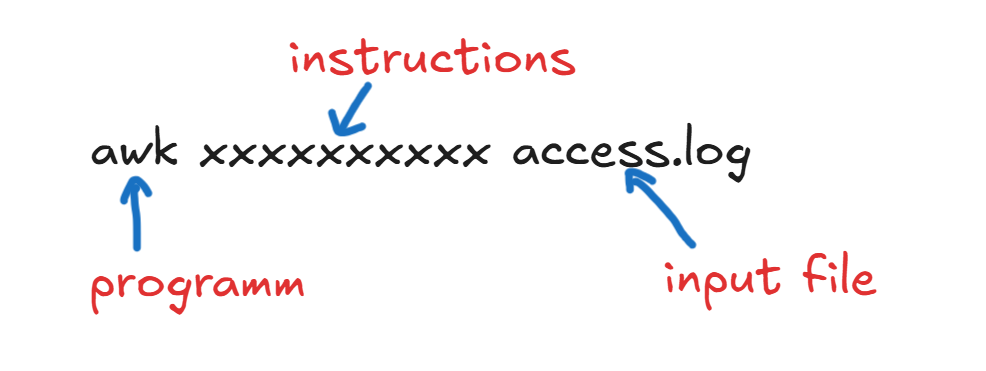
Just look at below screen shot and lets do run a awk for it ..
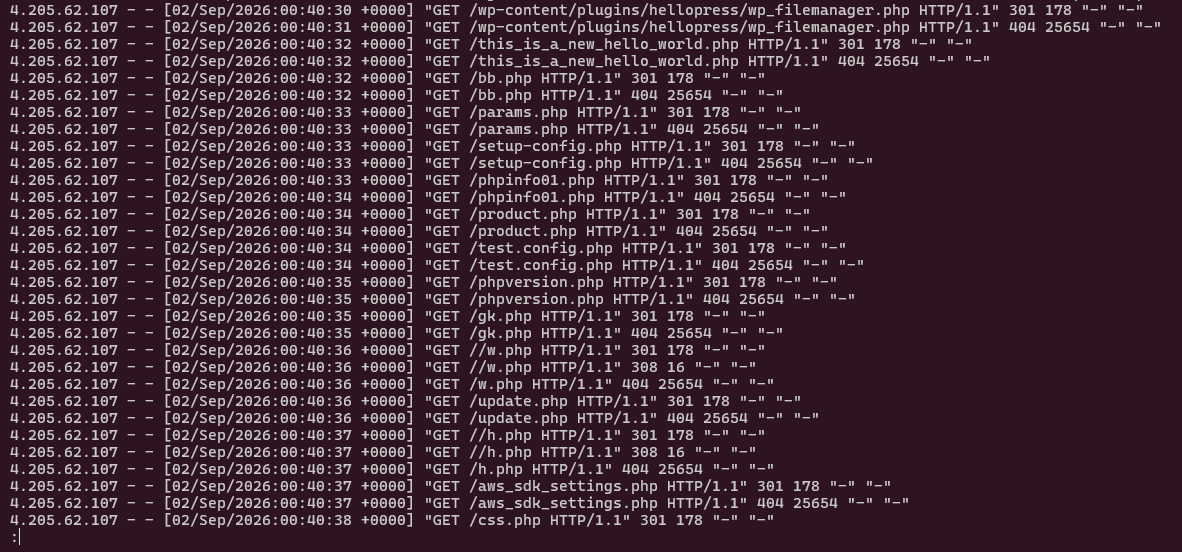
Lest run this awk comand
awk '$1=="4.205.62.107" {count++} END {print count}' access.log
Breaking that down:
awk, the program you're actually running.-
'$1=="4.205.62.107" {count++} END {print count}', the instructions you're giving AWK. -
access.log, the file full of data AWK is going to process.
So how does AWK actually behave, line by line?
So AWK just marches through your file, line by line. For every line,
it automatically breaks it into fields you can reference as
$1, $2, $3, and so on. Your
job is just to tell it what to check for, and what to do about it.
Eg-

            $1   = 4.205.62.107
            $2   = -
            $3   = -
            $4   = [02/Sep/2026:00:40:43
            $5   = +0000]
            $6   = "GET
            $7   = /aws_config.php
            $8   = HTTP/1.1"
            $9   = 301
            $10  = 178
            $11  = "-"
            $12  = "-"
Pattern and Action, the heart of AWK
awk 'PATTERN { ACTION }' INPUTThis is really the whole game. PATTERN answers "which lines should I even bother with?" and ACTION answers "ok, now that I've got one, what do I do with it?" Here's a real one:
awk '$9 == 500 {print $0}' access.log-
$9 == 500→ the pattern: only grab lines where the ninth field is 500. -
{print $0}→ the action: print the whole line out.
Fields: getting comfortable with $0, $1, $2…
Now guys you know awk automatically slices up every line into fields for you, using whitespace as the divider by default.
         $0    = the entire line
         $1    = first field
         $2    = second field
         $3    = third field
         ...
         $NF   = the last field
Let's ground this in a real Nginx access-log line:
4.205.62.107 - - [02/Sep/2026:00:40:30 +0000] "GET /wp-content/plugins/hellopress/wp-filemanager.php HTTP/1.1" 301 178 "-" "-"For this particular log format, AWK sees the whitespace-separated fields roughly like this:
      $1  = 4.205.62.107
      $6  = "GET
      $7  = /wp-content/plugins/hellopress/wp-filemanager.php
      $8  = HTTP/1.1"
      $9  = 301
$10 = 178$1 works as the client IP and
$9 works as the HTTP status code, but heads up, guys,
these field numbers are not some universal law of
AWK. They only line up this way because of this specific log format.
Change the format, and the numbers shift.
BEGIN and END, the bookends
On top of the normal line-by-line processing, AWK gives you two special blocks that run outside that loop:
          BEGIN   { ... }   # runs before any input is processed
          PATTERN { ... }   # runs while lines are being processed
          END     { ... }   # runs after everything has been processed
So for a counting job, BEGIN can set your starting values, the main rule counts up your matches as they come in, and END prints the final ok.
awk 'BEGIN { count=0 } $1=="4.205.62.107" { count++ } END { print count }' access.logLet's run a real example: counting requests from one IP
Ok, let's actually use this. Say you want to know how many requests
came in from 4.205.62.107:
awk '$1=="4.205.62.107" {count++} END {print count}' access.logAnd if the output comes back as:
920…that means AWK scanned the whole file and found 920 log lines where the first field matched that exact IP. Here's what's happening under the hood, conceptually:
Ok, AWK does way more than just counting
Since that middle part is a real little programming language, AWK gives you variables, conditions, arrays, loops, math, and pattern matching. Here's some examples.
      # Show IP and requested URL for 404 responses
      awk '$9==404 {print $1, $7}' access.log

      # Count HTTP status codes
      awk '{count[$9]++} END {for(code in count) print code, count[code]}' access.log

      # Count 500 responses
      awk '$9==500 {count++} END {print count}' access.log

      # Count 500 or 502 responses
      awk '$9==500 || $9==502 {count++} END {print count}' access.log
Arrays: how AWK counts categories, not just totals
This is honestly one of the best tricks AWK has for log work.It's the associative array. Instead of one lonely counter for one thing, an array gives you a separate counter for every key you care about, automatically.
awk '{count[$9]++} END {for(code in count) print code, count[code]}' access.log
So if a line comes in with status 500, count[500] ticks
up by one. Next line is a 404? count[404] ticks up. By
the time AWK hits the end of the file, the END block loops through
every status code it's seen and prints out each one's total. No
manual tallying required.
AWK vs grep, when do you actually reach for which?
grep "ERROR" access.log VS awk '$9==500 {print $1, $7}' access.log
grep is your go-to when you just need to find lines
containing some text or matching a pattern. quick and simple. AWK
earns its keep once you need to actually understand fields, apply
real conditions, count things, run calculations, or build structured
output.
-
grep→ mainly for searching / filtering text. -
awk→ for fields + conditions + calculations + reporting.
A production-style investigation, start to finish
Let's say users are reporting HTTP 500 errors around 09:15. Here's a realistic way to move from "something's wrong" to actually finding it, starting with the access log.
      # Find 500 responses
      awk '$9==500 {print $0}' access.log

      # Show client IP and URL for 500 responses
      awk '$9==500 {print $1, $7}' access.log

      # Count 500 responses
      awk '$9==500 {count++} END {print count}' access.log

      # Find requests from a specific IP
      awk '$1=="4.205.62.107" {print $0}' access.log
From there, you'd line up the timestamp with the Nginx error logs and whatever the backend service is logging. The real goal isn't just spotting an error, it's tracing the request's whole path to actually find the root cause.
Quick reference, bookmark this table
| AWK part | What it means | Example |
|---|---|---|
awk |
The command you're running | awk '...' access.log |
'PROGRAM' |
The instructions you give AWK | '$9==500 {print $1}' |
INPUT |
The file AWK chews through | access.log |
$0 |
The whole current line | print $0 |
$1 |
First field | client IP, in this log format |
$9 |
Ninth field | HTTP status, in this log format |
BEGIN |
Runs once, before any lines | BEGIN {count=0} |
END |
Runs once, after all lines | END {print count} |
{ ACTION } |
What to do when it matches | {count++} |
|| |
Logical OR | $9==500 || $9==502 |
The one thing to actually take away
At the end of the day, AWK is best thought of as a small text-processing language that happens to run as a command-line tool. You hand it a program (your instructions) and a source of input. It reads records, exposes their fields, checks your patterns, runs your actions, and can spit out genuinely useful summaries. That's exactly what makes it such a solid tool for Linux log analysis and everyday server troubleshooting.